Who is responsible when your LMS goes down at 9pm?
Who is responsible when an LMS goes down? See who answers for the cloud, the server and the platform, what happens after hours and what to ask first.

Balanita team Analysts, developers and support engineers
Published
9 min read
It depends on which layer failed and when. Your cloud provider answers for the infrastructure under its own service level agreement. Balanita answers for patching, monitoring, backups and response, and for the LMS under Manage, within your support window. Standard support runs on Sri Lanka business hours, so a 9pm outage in Dubai waits until the window opens.
At 9pm in Dubai, it is 10:30pm in Sri Lanka. At 9pm in Doha, it is 11:30pm. That gap is the honest starting point for this post.
Nobody should sign for a managed LMS without knowing what happens at that hour. Below is what happens, who answers for which part and what you can buy to change it. It builds on why the LMS server is managed separately from the platform.
Who is responsible for what when the platform goes down?
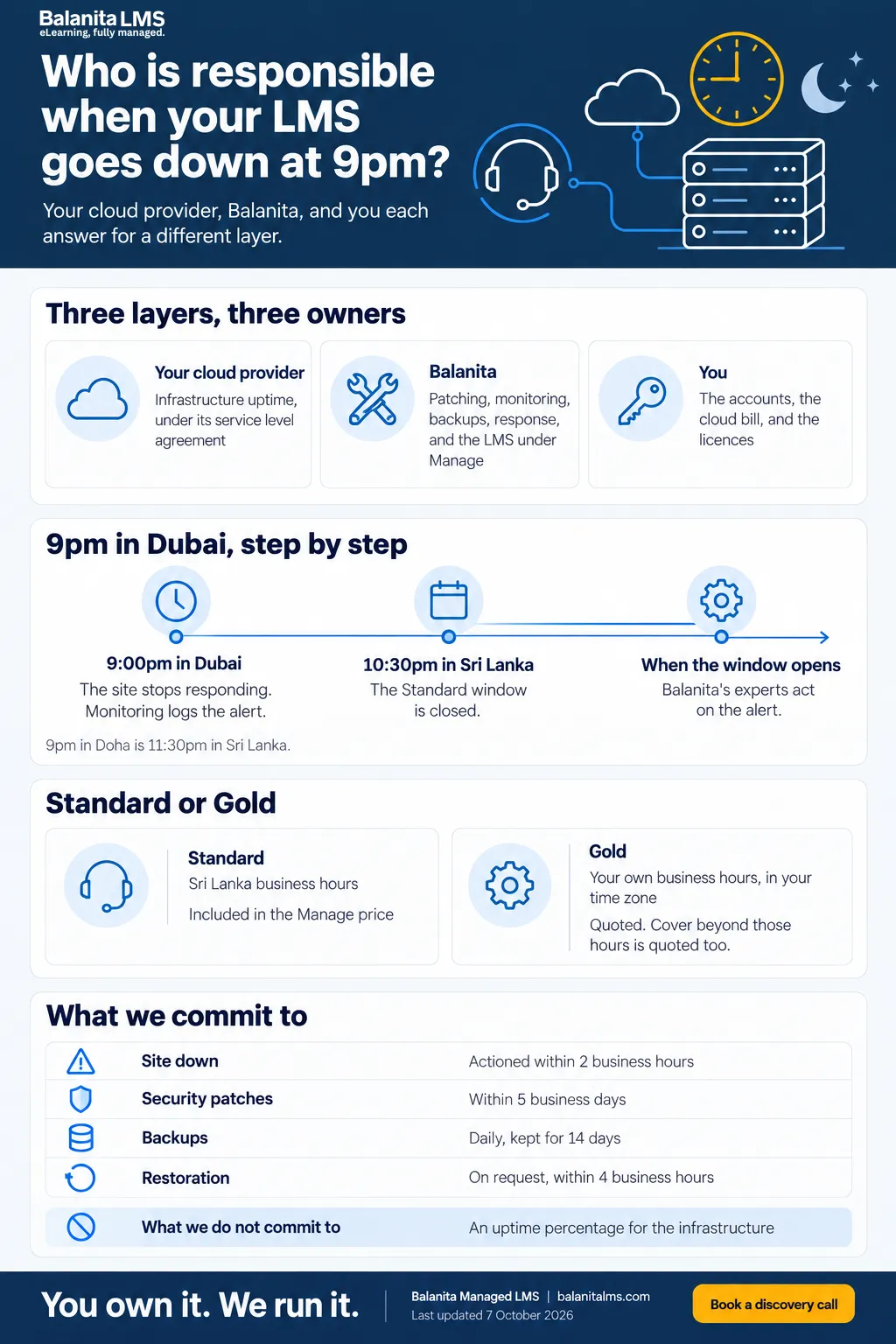
Responsibility splits in three. Your cloud provider answers for the underlying infrastructure, under its service level agreement. Balanita answers for the server’s patching, monitoring, backups and response, and for the LMS itself under Manage. You hold the accounts and the cloud bill. Every Balanita contract includes a responsibility matrix that states this.
Swipe sideways to see every column.
| Item | Who is responsible |
|---|---|
| Underlying infrastructure uptime | Your cloud provider, under its service level agreement. On your own servers, your own team. |
| Server, operating system and security patches | Balanita, under Server Management |
| Backups | Balanita, under Server Management |
| SSL certificate renewals | Balanita, under Server Management |
| Site uptime monitoring | Balanita, under Server Management |
| LMS updates, fixes and LMS support | Balanita, under Balanita Manage. If you do not take Manage, you handle these yourself. |
| The cloud bill | You, paid directly to your provider |
| Licences and third-party subscriptions | You, paid directly, in your name |
The uptime row is the one buyers skim past. It is also the one that decides who you call first. If the infrastructure underneath your server fails, the fix belongs to your cloud provider, not to Balanita and not to the platform.
What happens when the platform goes down outside support hours?
Monitoring runs around the clock, so the alert is logged when the site stops responding. Under Standard support, Balanita’s experts act on it when the Sri Lanka window opens. For cover in your own hours, there is Gold support. We would rather you hear this before an outage than during one.
Standard support follows Sri Lanka business hours. The exact hours are stated in your managed service agreement. Here is what that means in Gulf time:
Swipe sideways to see every column.
| When it is… | It is this in Sri Lanka |
|---|---|
| 9pm in Dubai (UAE, UTC+4) | 10:30pm |
| 9pm in Doha (Qatar, UTC+3) | 11:30pm |
Sri Lanka is UTC+5:30. None of the three places changes its clocks for daylight saving, so the gap stays the same all year.
Here is the same outage under each plan:
Swipe sideways to see every column.
| Moment | Standard support | Gold support |
|---|---|---|
| The site stops responding at 9pm in Dubai | Monitoring logs the alert. | Monitoring logs the alert. |
| Who acts on it | Balanita’s experts, when the Sri Lanka window opens. | Balanita’s experts, within your own business hours. If 9pm falls outside them, out-of-hours response is quoted. |
| Response for a site that is down | Actioned within 2 business hours. The count runs inside the window, so a 10:30pm alert starts its clock when the window opens. | Actioned within 2 business hours, counted inside your own window. |
| If the cause is the cloud provider | The provider’s service level agreement applies. | The provider’s service level agreement applies. |
| If you need an earlier version of the site back | Restoration on request, within 4 business hours. | Restoration on request, within 4 business hours. |
| What you see afterwards | Incidents and how they were resolved appear in the monthly review, or the monthly server summary, delivered by the 5th. | The same. |
Standard support does not cover your evening. That is a fact about the plan, not a flaw we are hiding. Plenty of training can wait until the next morning. Some cannot.
What does Gold support change?
Gold support moves your support window to your own business hours, in your own time zone. Cover beyond those hours, such as a 9pm response, is quoted based on your requirement level. Gold is quoted per client, so there is no list price.
Swipe sideways to see every column.
| Standard | Gold | |
|---|---|---|
| Support window | Sri Lanka business hours | Your own business hours, in your own time zone |
| Price | Included in the Manage price. Also the window that applies if you take Server Management on its own. | Quoted based on your requirement level |
| How server incidents are handled | Alerts outside the window are logged and actioned when it opens. | Out-of-hours response is quoted based on your requirement level. |
Round-the-clock human response is not part of the standard service. If your training must be supported at night or on a day off, say so on the discovery call, before you sign. We tell you what that cover would involve, and what it would cost, before you commit to anything.
What does Balanita commit to, and what does it not?
Balanita commits to response and recovery times: a critical incident actioned within 2 business hours, security patches within 5 business days and restoration within 4 business hours on request. Balanita does not commit to infrastructure uptime. Your cloud provider’s service level agreement covers that, or your own team if you use your own servers.
Swipe sideways to see every column.
| What we commit to | The commitment |
|---|---|
| Critical incident | Site down: actioned within 2 business hours. |
| Alert response | Actioned within your support window. |
| Security patches | Applied within 5 business days of a vendor release. Within 48 hours for an actively exploited vulnerability. |
| Backups | Daily and automated. Kept for 14 days. |
| Backup restoration | On request, within 4 business hours. |
| Planned maintenance | Announced 48 hours ahead. |
| Monthly reporting | Delivered by the 5th of the following month. |
Swipe sideways to see every column.
| What we do not commit to | Why |
|---|---|
| An uptime percentage for the infrastructure | The server and network belong to your cloud provider or your own team. A percentage would be a number we cannot control. |
| Staying online through a regional provider incident | Standby servers and multi-region failover are not part of the standard service. They are quoted separately after we review your scope. |
| Support outside your window | Standard follows Sri Lanka business hours. Anything beyond your window is quoted. |
The trade-off between one cloud region and two is covered in how LMS data residency works in the UAE and Qatar.
Your cloud provider may also schedule its own maintenance on the underlying infrastructure. It notifies you directly by email. Forward that notice to us, so we can prepare your site for it.
What should you ask any LMS provider about outages before you sign?
Ask six things: what hours the support window covers, in whose time zone, what happens to an alert outside the window, what the response time is for a site that is down, who answers for the infrastructure and how fast a backup can be restored. Write the answers into the contract. Vague answers are a warning.
Swipe sideways to see every column.
| Question | A clean answer | Balanita’s answer |
|---|---|---|
| 1. What hours does support cover? | Stated in the contract | Stated in your managed service agreement. |
| 2. In whose time zone? | Named plainly | Standard: Sri Lanka business hours. Gold: your own business hours, in your own time zone. |
| 3. What happens to an alert outside the window? | A written answer | It is logged and actioned when the window opens. |
| 4. How fast is a down site actioned? | A number | Within 2 business hours, inside your window. |
| 5. Who answers for the infrastructure? | A named party | Your cloud provider’s service level agreement, or your own team on your own servers. |
| 6. How fast can a backup be restored? | A number | On request, within 4 business hours. Daily backups are kept for 14 days. |
What should you set up before an outage happens?
Decide in advance who on your side gets the alert, whether your training can survive a wait until the window opens and whether you need cover in your own hours. If a live compliance deadline falls on an evening or a weekend, tell us at the discovery call, so we can scope cover around it.
A short preparation list:
- Name two people. A key contact and a technical administrator. Both receive ticket system logins.
- Keep the support route handy. Tickets and support email follow the same window, so keep the address where your team can find it at 9pm.
- Know your first check. When the site is down, look at your cloud provider’s status page first. Infrastructure incidents are the provider’s to fix.
- Forward provider notices. Every maintenance email from your cloud provider goes to us.
- Know your recovery options. Daily backups, kept for 14 days. Restoration on request, within 4 business hours.
- Decide whether waiting is acceptable. If it is not, ask about Gold or out-of-hours cover before you sign, not after.
What does support cost?
Standard support is included in the Manage price. At Balanita, Manage is US$ 450 a month for up to 500 active learners and US$ 950 a month for 501 to 1,500. Server Management is US$ 150 and US$ 300 a month on the same bands. Gold support is quoted based on your requirement level. Larger bands are quoted too.
Prices are in US dollars and exclude taxes. An active learner is anyone who logs in at least once in the billing month. Annual prepayment gives 12 months for the price of 10, on Manage, Server Management or both. The Balanita pricing page has the full list.
What should you tell us on a discovery call?
Tell us where your learners are, which hours they train in and any date when an outage would hurt. On the free 30-minute call we tell you whether Standard is enough or whether you need Gold, and we say so honestly if we are not the right fit. No platform is named on the call. Your exact first-year cost is confirmed in writing before any payment.
Frequently asked questions
What happens if my LMS goes down at 9pm in Dubai or Doha?
Monitoring runs around the clock and logs the alert. Under Standard support, which follows Sri Lanka business hours, Balanita's experts action it when the window opens. 9pm in Dubai is 10:30pm in Sri Lanka, and 9pm in Doha is 11:30pm. Gold support follows your own hours, and cover beyond them is quoted.
How fast does Balanita respond when the site is down?
A site that is down is a critical incident, actioned within 2 business hours, inside your support window. Business hours means the support window of your plan, so the clock follows Standard or Gold. Backup restoration, when you need it, is on request within 4 business hours.
Does Balanita guarantee LMS uptime?
No. Balanita commits to patching, monitoring, backups and response times. The uptime of the underlying server and network belongs to your cloud provider under its own service level agreement, or to your own team on your own servers. Standby servers or multi-region failover are quoted separately.
What should I do first when my LMS goes down?
Check your cloud provider's status page, because infrastructure incidents are the provider's to fix. Then raise a ticket or email support, so Balanita has it on record. Name a key contact and a technical administrator beforehand, since both receive ticket system logins.

Written by
Balanita team
Balanita's analysts, developers and support engineers choose, build and run learning platforms for corporate and professional training teams.
Balanita on LinkedIn